 Purelapse
Timelapses without flicker.
Purelapse smooths the brightness of your RAW or JPG sequences, drives ART, RawTherapee or darktable and renders a clean video – from sunsets to holy grail.
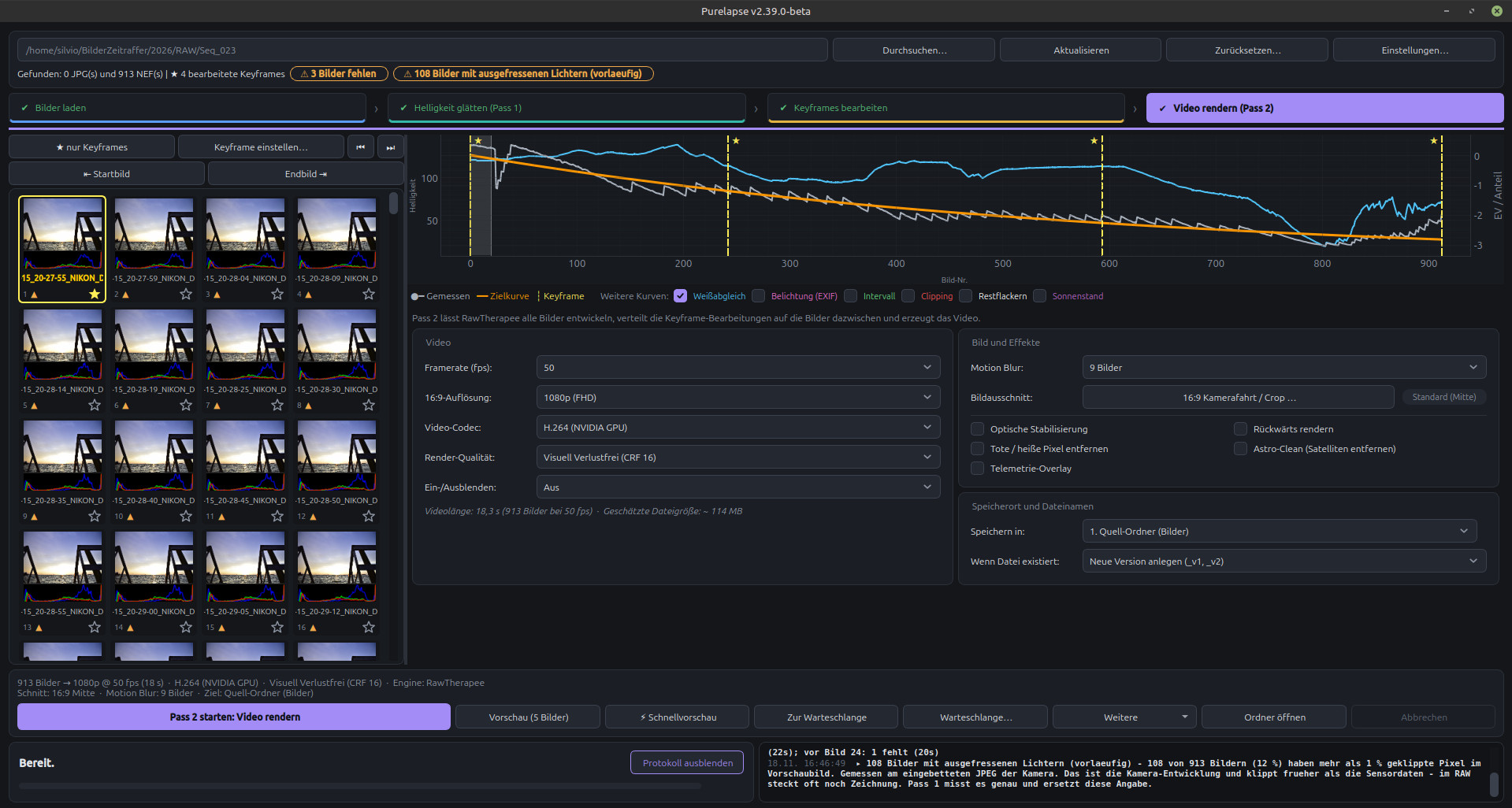
See for yourself.
Each shows the same sequence: on the left straight out of the camera, on the right after Purelapse. Both videos were made entirely in Purelapse – deflickering, developing with the RawTherapee engine and video output, no other program involved.
Video without sound · 18 seconds
Second series in original quality · 2560 × 720 · 50 fps · 29 seconds · 34 MB – click to play, full screen recommended
Three steps from folder to video.
A step bar guides you through the workflow. Completed steps are marked, and you can go back to any of them at any time.
Smooth brightness
Purelapse measures every RAW in linear light and writes an exposure correction into the engine's sidecar files. You see the target curve in the chart right away.
Grade keyframes
Mark individual frames as keyframes and adjust white balance, contrast or saturation – right inside Purelapse or in the engine. Everything in between is blended smoothly.
Render video
The engine develops all frames, Purelapse re-measures and corrects in further rounds until the residual flicker is below 0.008 EV. Then the video is created.
Everything in one program.
From the first measurement to the finished video file – without switching between half a dozen tools.
Deflicker in linear light
16-bit measurement that stays reliable even in dark night shots. With a measuring area when the sun or lamps get in the way.
Keyframes
Set anchor frames, and Purelapse carries the settings smoothly across all frames in between.
Quick settings
Colour temperature, green balance, brightness, contrast, saturation, sharpening and denoising – with a real preview from the engine.
Motion blur
Averages 3 to 25 frames into one video frame – for softly drifting clouds, water and stars.
Camera move & effects
16:9 move from A to B, stabilisation, denoising, hot pixels, astro clean, telemetry overlay, fade in and out.
Preview & comparison
Quick preview in minutes from the camera's embedded images, a five-frame preview, an untouched version and a comparison video.
Warnings
Detects missing frames, clipped and pink highlights, and a fluctuating white balance.
Queue
Line up several folders with their own settings and let them run overnight.
Telegram
A message on your phone when a run is finished – or when something goes wrong.
From day into night.
In holy-grail shots the camera changes shutter speed, aperture or ISO during the sequence. Purelapse is built for exactly that.
- Compensates exposure jumps. Every step caused by changed camera settings shows up as a brightness jump in the measurement and gets smoothed out.
- Ramping interval. If the interval grows with the shutter speed, that's treated as normal – only real gaps are reported.
- Choose the light progression. Constant, sunrise or sunset: if you like, the progression only gets brighter or only gets darker.
- Sun elevation in the chart. With GPS from the image, Purelapse shows the limits of civil, nautical and astronomical twilight.
Up to 8K, up to 120 frames per second.
Rendering is done with FFmpeg – on the CPU or on the graphics card. Before every run, Purelapse checks that the chosen hardware codec works on your computer.
- Resolution (16:9)
- 720p1080p1440p4K8K
- Frame rate
- 23.976242529.97305059.9460120 fps
- Codecs
- H.264H.265 / HEVCApple ProRes 422 HQ
- Encoding
- CPUNVIDIA NVENCIntel QuickSyncVAAPI (AMD / Intel)
- Quality
- Visually lossless (CRF 16)High (CRF 20)Standard (CRF 23)Low (CRF 28)
- Motion blur
- off3456789101215182025 frames
Your engine, your edits.
Purelapse only changes the exposure in the profile. Whatever you've set up in the engine stays as it is.
ART
- Deflicker and recalibration
- Keyframes
- Quick settings
- Real preview
- Highlight reconstruction
RawTherapee
- Deflicker and recalibration
- Keyframes
- Quick settings
- Real preview
- Highlight reconstruction
darktable
- Deflicker and recalibration
- Keyframes
- Quick settings
- Real preview
- Highlight reconstruction
darktable stores its module settings as binary data in the XMP file, which an external program can't edit reliably. So with darktable you grade keyframes directly in darktable. Formats: NEF, CR2, CR3, DNG, ARW, RAF, ORF, RW2, PEF, SRW.
Ready in two minutes.
- Install RawTherapee or ART for the RAW workflow. JPG sequences don't need an engine.
- Download the AppImage. It contains Python, Qt, OpenCV and FFmpeg – nothing to install.
- Make it executable and start it with the two commands in the box.
- In Purelapse, open Settings… and enter the path to
rawtherapee-cliorART-cli.
$ chmod +x Purelapse-2.39.0-beta-x86_64.AppImage
$ ./Purelapse-2.39.0-beta-x86_64.AppImage
Runs on Linux Mint 21 / Ubuntu 22.04 and newer (x86_64). All versions and changes →
Happy to share.
Purelapse is a beta. Feedback, bug reports and ideas are very welcome.